Through the years of working with AdWords, I’ve experienced many
different scenarios and worked in many different environments. It’s
funny how sometimes you don’t even notice the good things around you
until they’re gone.
When I’ve changed jobs or positions in the past, I’ve sometimes
forgotten the habits I had so carefully built up. After some time I
started to ask myself why I ever stopped doing so to end up implementing
the habit again with great success.
I’ve recognized 5 habits that have made me better at managing AdWords
campaigns, but they can be pretty much used in any kind of creative
environment.
1) Don’t Work In A Vacuum
I have often met advertisers who have been working for years on their
account with different degrees of success, but who have, as of late,
rapidly experienced declining results.
Even though there can be many reasons to this, one of the most
frequent ones is that advertisers didn’t look beyond their own AdWords
account. It’s important to realize that your AdWords ads appear
alongside ~10 other ads as well as:
- Organic Search Results
- Google Maps Listings
- Related Search Queries
- Image Results
- Product Listing Ads
If you don’t pay attention to what your competitors are doing, then
you’ll never know how to go about optimizing your campaigns. You can, of
course, try to shoot bullets into the dark hoping to hit something, but
it’s a lot easier when you can see what kind of obstacles you’re up
against.
Reasons Why You Should Pay Attention To Your Competition
Ad Extensions: If your competitors have suddenly been granted
AdWords Seller Ratings, launched Product Listing Ads or have created
more effective Ad Sitelinks, then you’ll most likely experience a rapid
decline in your AdWords bottom-line.
New Promotions: Your competitors will sometimes have new
promotions that will steal all your traffic. This especially happens if
you’re in an industry where you’re just reselling the same products. You
will most likely experience a decrease in performance if your
competitor is having a 20-30% Spring Sale.
Copied Ad Copy: I’ve seen countless examples of great AdWords
accounts where their ads had been copied word for word. This greatly
diminished the returns of the formerly successful ads.
Making sure that your ads are always unique (even if it means reinventing the wheel) is crucial for your future success.
2) Try Likely And Unlikely Changes – Don’t Just Stick To Your Own Opinion
Just because a certain keyword or ad copy doesn’t strike you as the
best way to go, doesn’t mean that you shouldn’t try it out. There are so
many different people in the world that might react differently to
different factors.
If you only build your AdWords campaigns based on what you like and
what you find aesthetically pleasing, then you might be missing out on
big performance gains. I’ve shaken my head several times in dismay
because I “had to” run ads that I didn’t personally like, but that did
the job a lot better than the new, fancy ads I had just created.
Keep an open mind during your brainstorming sessions and commit to
regularly testing your variations. You might be surprised by how well a
“bad” ad performs.
3) Divide And Conquer
If you’ve read any
inc.com or
Lifehacker
articles in your career, then you’ll most likely be obsessed about
keeping your work area organized and neat. To eliminate all clutter
often allows you to focus better on the task at hand and can drastically
reduce the time spent on any given task.
With AdWords, this practice gets even more important.
I rarely work with accounts I haven’t already built from scratch or
at least reorganized. Even though it’s time-consuming to reorganize
large AdWords campaigns, I find it absolutely necessary unless I’m up
for spending twice as long optimizing or spotting trends in campaigns.
Keeping track of hundreds or even thousands of keywords can be an
impossible task if you don’t divide them into easy-to-manage campaigns
as well as ad groups.
4) Don’t Be Lazy
AdWords is not about magical breakthroughs or complex strategies.
Achieving success with AdWords is mainly about making sure that your
foundation is covered.
When teaching Google AdWords management I often highlight the basics
over and over again. At some seminars intermediate attendees have been
vocal about the fact that they didn’t come to listen to the basics and
that they were wasting their time. In many cases, I’ve been able to open
their AdWords accounts on the monitor and point out where they haven’t
followed the basics. Simple changes could easily improve their
campaigns.
As human beings, we often look for shortcuts or overnight successes
that will skyrocket us to the next level without having to work quite as
hard for it. AdWords managers are no exception to this.
The truth of the matter is that if you follow a rather simple
approach to building and maintaining AdWords campaigns, you’ll more than
likely have your hands full of weekly management tasks. Only after you
have the basics in place, is it beneficial to start looking at some of
the more advanced strategies to increase your AdWords performance.
5) Get Feedback And Sparring From Other Professionals
Many accounts have been lost due to simple mistakes or lack of
double-checking. Even after working with AdWords for years, I still
double-check all my work before uploading it to the AdWords account and I
frequently get colleagues to review big accounts for me.
After working with the same account for months or years, you’ll start
to get blinded to the opportunities that are lying in front of you.
Getting a third party to review everything with a fresh set of eyes can
serve a great purpose. I usually use the following reviews as ways to
open my eyes to new account changes:
Third Party Reviews: I like to classify these as third party
reviews, as not everyone has access to other AdWords professionals
inside the same organization. Getting another AdWords professional to
review your account (favor, payment or quid pro quo) is a great way to
find out what you’re missing.
Campaign Presentations: This is another thing that I
personally like doing a lot. I’d schedule a presentation with some of
the most curious individuals in my company and I go through the entire
account explaining why I’ve done certain things.
It’s quite normal that while I’m explaining the campaign structure or
ads to other people, I’ll come up with new ideas or see the campaign in
a new light.
Internal Reviews: Having a colleague who doesn’t know anything
about AdWords asking you why you’ve chosen a certain keyword or why an
ad has been written in a certain way can also be beneficial. In my
experience the two other forms of feedback work better, but if you have
no other choice, then internal reviews from inexperienced colleagues can
be better than doing nothing.
Habits Are Nature’s Way Of Keeping You On Track
Many times we end up straying from the path we had originally laid
out for ourselves. Sometimes we discover new and better paths, but
sometimes we take on “the grass is greener on the other side” kind of
attitude.
Always trying to find the “next big break” can be a certain way to
take away consistency and resilience in anybody. Working consistently on
a mediocre thing will often produce better results than never being
fully committed to a strategy.
Image credits: Google
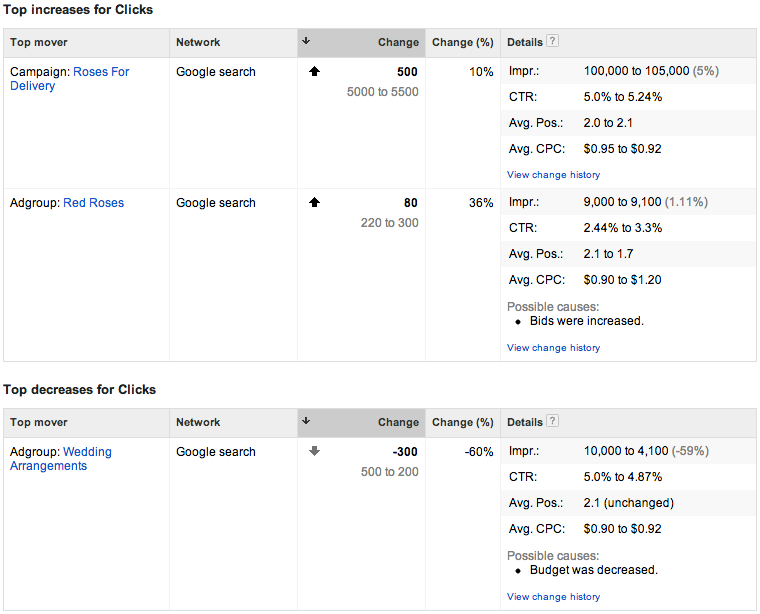
 Below the summary is detail on each top mover. What is not immediately apparent is that the details table (shown below) has two modes, Cost and Clicks. You select which you’d like to view by clicking the “Cost” or “Clicks” headers above the summary table.